XZEN / HYPEROS
Welcome
This is a collection of guides, tweaks and notes for my Redmi Note 13 Pro 4G running HyperOS 3.1 / 3.0.305.0. The guides here are based on my own testing. Both methods survived reboots without issues on my device. Most changes use existing HyperOS flags and can persist without root. A few features require root, but after temporarily rooting again, the missing patches automatically apply and everything works fine.
These guides focus on methods using built-in flags and reversible tweaks.
They do not replace system APKs and were tested to survive reboots on my setup.
HyperCeiler + HyperLight
Complete installation guide, module setup and recommended settings.
Go to guideBlur & Advanced Textures
Enable additional blur, textures and visual improvements using HyperOS flags.
Go to guideHyperLock Extended
Heart battery, matching status bar colors, and custom Control Center images.
Go to guide →Quick Info
| Device | Redmi Note 13 Pro 4G |
|---|---|
| HyperOS Version | 3.1 / 3.0.305.0 |
| Android Version | 16 |
| Tested By | XZEN (personal device) |
| Status | Stable (survives reboot) |
What Survives Reboot?
- Most tested HyperOS flags remain enabled without root.
- Built-in visual options such as blur and textures persist on this device.
- Root-dependent hooks and patches reapply when temporary root is restored.
- No bootloops were encountered with these two methods in my testing.

Preparation
Tested environment
These instructions document a Redmi Note 13 Pro 4G (emerald), Android 16, HyperOS 3.1 / build 3.0.305.0. Different devices, regions or security patches can behave differently.
| Device | Redmi Note 13 Pro 4G |
|---|---|
| Firmware | HyperOS 3.1 · 3.0.305.0 |
| Platform | Android 16 |
| Shell | Brevent for settings, Termux with root for privileged properties |
Know the difference
Native flags typically remain written after temporary root ends. Xposed hooks need injection to be active. This setup was tested to boot without root, then restore hooks after temporary root is re-enabled.
Where to start
- Record your current system settings and persistent property values.
- Check your exact firmware before attempting temporary root or system modules.
- Read the HyperCeiler + HyperLight guide for the Xposed route.
- Read Blur & Advanced Textures for system flags and Brevent commands.
- Apply one change at a time, then check its behavior through a normal reboot.
The commands in the blur guide are already shell commands. Don't prefix them with adb shell inside Brevent.
HyperLock Extended.
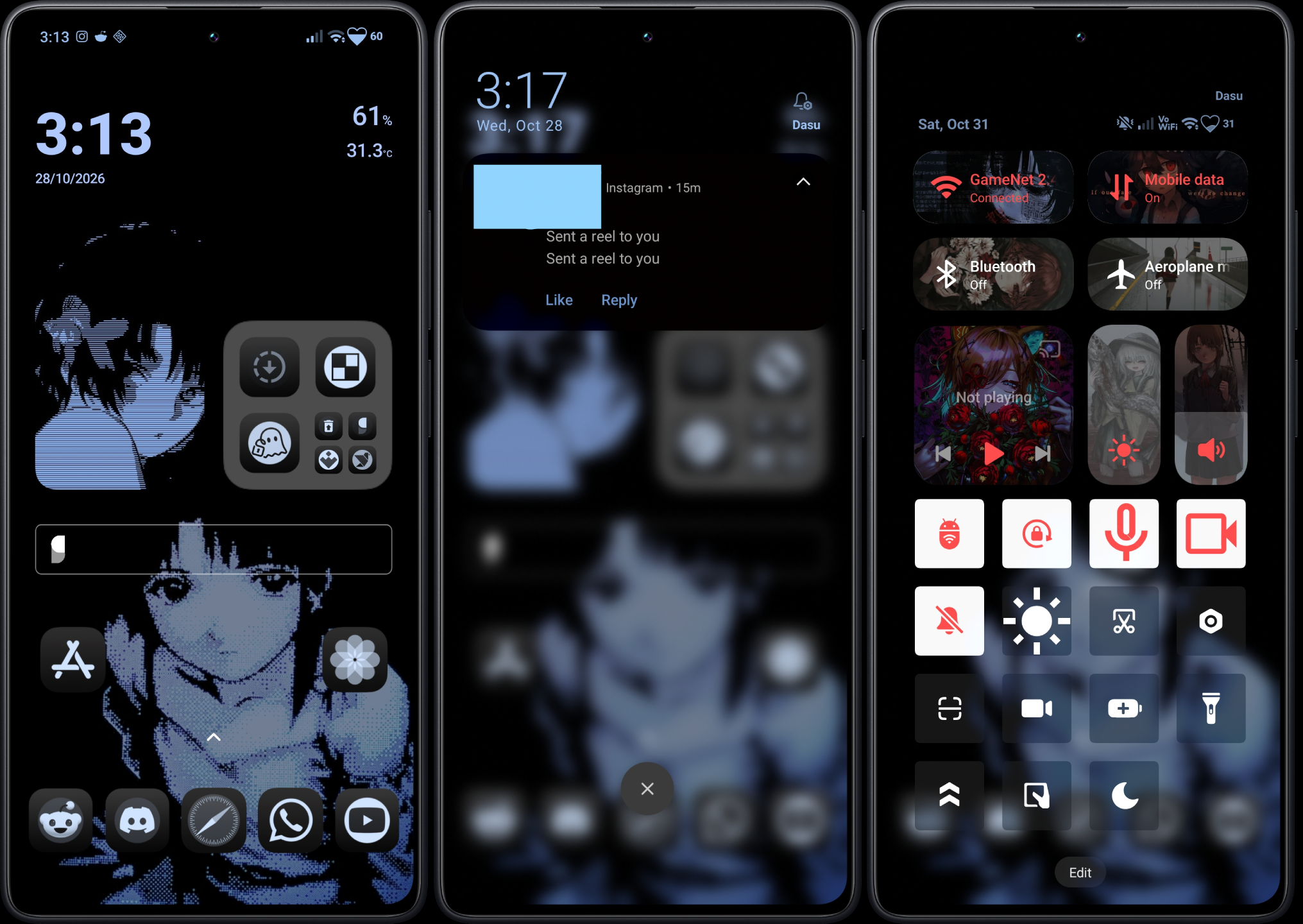
A HyperDuo fork with a heart-shaped battery, matching status bar colors, and a Control Center you can make your own.
A look at the setup
A screenshot from my Redmi Note 13 Pro 4G: the heart battery sits alongside matching status icons, with custom images and colors throughout the Control Center.
Make the status bar yours
- Heart battery: A crisp outline with a bottom-to-top fill that follows the battery level. Ring, Capsule and Default styles remain available.
- Battery colors: Choose normal, charging, low and full colors, with optional automatic tint and matching colors for the clock, Wi-Fi, signal, notifications and shade headers.
- Wave and pulse: Animate the heart while charging, or opt to keep it animated when unplugged. Continuous animation may use more battery.
- Brightness and percentage: Adjust the heart's brightness and show the percentage inside, to the right, or hide it.
- Control Center images: Choose and crop backgrounds for Wi-Fi, mobile data, Bluetooth, airplane mode, the music card, brightness and volume; adjust the images' overall brightness.
- Control Center colors: Pick active and inactive icon colors, plus separate active and inactive card text colors. Optional large Bluetooth and airplane cards add another row.
- Theme backup: Export settings and selected Control Center images as a ZIP from About, then import it to restore or share the theme. Custom fonts are not included.
Install the framework
Use DFRoot or GhostLock for temporary root, whichever supports your device. If you already followed the HyperCeiler + HyperLight setup, reuse your existing root and Vector installation.
Enable the module in Vector
- Prepare a compatible root and Xposed/Vector environment for your device.
- Install the HyperLock Extended APK from the project's releases when available.
- In Vector → Module Management, enable the module and scope it to
com.android.systemui. - Restart SystemUI or reboot with your root and injection environment active.
- Open HyperLock Extended, choose Heart and explore the Heart battery and Control Center settings.
Compatibility
Based on HyperDuo, with the Heart mod by Yuilix. I tested the extended features on my Redmi Note 13 Pro 4G (emerald), Android 16, build OS3.0.305.0.WNFMIXM. SystemUI implementations differ, so behavior can vary across devices and ROM versions.
GitHub Releases · availability may vary
HyperCeiler
+ HyperLight.
The temporary-root and Xposed setup used on the Redmi Note 13 Pro 4G. This guide is based on the original r/HyperOS discussion.
What you'll need
Prepare KernelSU and Zygisk
- Confirm your exact device/patch level is supported by the chosen root method.
- Install KernelSU manager and initialize temporary root with DFRoot or GhostLock, whichever supports your device.
- Verify KernelSU reports root access for the current boot.
- Install the Zygisk Next ZIP through KernelSU's Modules section.
- Install Vector's compatible module package through KernelSU as instructed by Vector's release notes.
I had intermittent failures with GhostLock and got better results with DFRoot on my device. Some devices work with GhostLock when DFRoot fails; use whichever works for your kernel. A supported GhostLock profile must match the exact kernel build.
Enable both customization modules
- Install the HyperCeiler and HyperLight APKs.
- Open Vector, enable the modules, and use each module's recommended scope list.
- Use only package targets present on your firmware.
- Make one simple visual change first and confirm it works.
The following are major HyperLight scope targets noted in the guide. They are references, not a universal recommendation to enable all scopes on every device.
com.android.systemui
miui.systemui.plugin
com.miui.securitycenter
com.miui.personalassistant
com.android.settings
com.xiaomi.subscreencenter
com.miui.aodSoft restart and verify
After installing the modules, complete the supported soft-restart sequence for your root setup, then check if the modules still working by opening KernelSU>Module> Vector> press on action button, if it does not launch then go to Homepage of KernelSU and soft-reboot once again. After the 2th reboot it is guaranteed to work and then go check whether Vector reports HyperCeiler and HyperLight as active. Some individual changes require a restart of the targeted process, such as SystemUI. After a full reboot without root, I can restore temporary root and my saved patches load again automatically.
Do not assume an active Xposed toggle means every hook works. Xiaomi can rename or remove internal classes and fields between firmware builds.
If nothing changes
Verify the scope, module activation, and target-process restart. Check Vector logs for errors such as NoSuchFieldError or ClassNotFoundException. Those can indicate a hook no longer matches Xiaomi's implementation.
Don't add extra signature-bypass or framework patch modules as a generic fix. Changing more system components makes failures much harder to isolate.
Blur & advanced
textures.
A Brevent and temporary-root reference for enabling Xiaomi's background blur and advanced textures. Adapted from the original Turkish guide.
Tools and permissions
These tweaks enable flags that already exist in HyperOS. Most of the listed settings put system commands can be applied through Brevent without root; the separate persist.sys.* property commands require a root-capable shell on this setup. HyperUnlocked is optional and separate from the main blur commands. The native flags survived normal reboots without root on my phone.
Apps you need
For temporary root, use DFRoot or GhostLock, whichever works for your device. Both can provide root for the Termux commands on supported setups.
- Install Brevent and start its service using the method supported by your device.
- Install Termux from its official GitHub release and open it once.
- Start your temporary-root environment. Allow Termux root access in KernelSU → Superuser, or approve its root request when prompted.
- After granting access, use Restart app for Termux in KernelSU, then open Termux again.
- Run the
su -cproperty commands below in Termux and approve any root prompt. Run the separatesettingscommands in Brevent's command runner.
These are already shell commands. Do not add adb shell in Termux or Brevent. Granting permission lets Termux request root; each su -c command runs with root.
Read before changing
Save the original property and settings values. There is no safe universal reset value for every Xiaomi firmware.
su -c 'getprop persist.sys.computility.cpulevel'
su -c 'getprop persist.sys.computility.gpulevel'
su -c 'getprop persist.sys.advanced_visual_release'
su -c 'getprop persist.sys.background_blur_supported'settings get system miui_control_center_use_advanced_textures
settings get system control_center_blur_style
settings get system use_blur_render
settings get system background_blur_enable
settings get system miui_blur_enable
settings get system miui_advanced_animationsEnable visual-level flags
Run these four commands in Termux after enabling temporary root and granting Termux root permission. These are existing Xiaomi feature flags, rather than replacements for system APKs. I tested them on build 3.0.305.0, and they survived full reboots on my setup. Root is needed to write these properties, while ordinary operation afterward does not require keeping a temporary-root session active. Their names do not mean they physically overclock your CPU or GPU.
su -c 'setprop persist.sys.computility.cpulevel 6'
su -c 'setprop persist.sys.computility.gpulevel 6'
su -c 'setprop persist.sys.advanced_visual_release 1'
su -c 'setprop persist.sys.background_blur_supported true'Enable blur and textures
Paste these native HyperOS settings into Brevent's command runner. I tested these flags on build 3.0.305.0, and they remained enabled after reboots without root. Whether another Xiaomi build uses each flag depends on its firmware and features.
settings put system miui_control_center_use_advanced_textures 1
settings put system control_center_blur_style 1
settings put system use_blur_render 1
settings put system background_blur_enable 1
settings put system miui_blur_enable 1
settings put system miui_advanced_animations 1Restart and confirm
Apply the changes, use the restart method supported by your setup, and check Settings → Display & brightness → Advanced textures. For Control Center appearance, open the shade and compare the blur intensity directly.
On the tested phone, the configured native blur/texture flags remained in place after a normal reboot. Root-dependent module effects may disappear until temporary root is restored; in my tests, those saved effects reapplied automatically. Visible results can still vary by hardware, ROM and SystemUI components.
HyperUnlocked
The original guide also references HyperUnlocked v2.3.2 for additional visual features. This is a separate KernelSU module; test the underlying blur settings first so you can tell which change caused an effect.
Restore previous values
Use the original values you recorded in step 02. Do not assume all settings originally contained 0 or false. If a setting did not exist, consider deleting that setting rather than forcing an invented default.
# Replace ORIGINAL_VALUE with your recorded value.
# Examples only:
# su -c 'setprop persist.sys.advanced_visual_release ORIGINAL_VALUE'
# settings put system control_center_blur_style ORIGINAL_VALUE
Source: r/AndroidTurkiye · HyperOS bulanıklık ve gelişmiş dokular rehberi
Kernel Support List
Search exact kernel releases and devices from GhostLock’s upstream support table, plus one locally reported device clearly marked “Personal device”.

uname -r string. A matching 5.15 / 6.1 / 6.6 / 6.12 prefix, or the same device name alone, does not confirm support. Read the upstream notes before relying on a profile. However you can check if your device supports it even if your device is not listed here, either search by kernel version or install Ghostlock, if you see a Green pill says Profile Supported then you're good to go| Exact kernel release | Devices | Family | Note |
|---|---|---|---|
5.10.236-android12-9-00014-gb97c62c4e7d1 | Sony Xperia 5 IV (SO-54C / PDX-224) | 5.10 | Listed |
5.15.41-android13-8-g8dc4c75ab7d8-ab1673212412 | MEIZU 20 Pro | 5.15 | Shizuku suggested |
5.15.119-android13-8-g6ff5097ee32a-ab1764665171 | MEIZU 21 Note | 5.15 | Listed |
5.15.167-android13-8-00017-gb1f32b310a30-ab12826353 | Red Magic 8 Pro | 5.15 | Listed |
5.15.178-android13-8-00025-g7feb0b0b7cd8-ab14134651 | Sharp AQUOS R8 SH-R80 | 5.15 | Listed |
5.15.189-android13-8-00016-g51bba4309aac-ab14546557 | Sony Xperia 1 V | 5.15 | Listed |
5.15.189-android13-8-00004-g1c3825f8ac0a-ab14110541 | Sony Xperia 1 V | 5.15 | Listed |
5.15.206-android13-8-00056-g3f87b8704e9e-ab15683575 | ASUS Zenfone 10 | 5.15 | Listed |
6.1.25-android14-11-maybe-dirty | MEIZU 21 / MEIZU 21 Pro | 6.1 | Listed |
6.1.78-android14-11-gb6577b760481-ab12075023 | Redmi Note 14 Pro 5G | 6.1 | Listed |
6.1.115-android14-11-ga2521ca27699-ab13294383 | POCO X6 Pro | 6.1 | Listed |
6.1.118-android14-11-ga3b9c44908dd-ab13320413 | Redmi Note 15 Pro+ | 6.1 | Listed |
6.1.118-android14-11-gca0ef6d17716-ab13624819 | Xiaomi 14 | 6.1 | Listed |
6.1.134-android14-11-maybe-dirty | Boox Onyx NoteAir6C | 6.1 | Listed |
6.1.134-android14-11-maybe-dirty | Boox Onyx NoteAir6C | 6.1 | Listed |
6.1.138-android14-11-g0c3d559bcd85-ab14529422 | Xiaomi 14 | 6.1 | Listed |
6.1.138-android14-11-g151cf2b6bfbe-ab13719792 | Lenovo Xiaoxin Pad Pro 12.7 (TB375FC) | 6.1 | Listed |
6.1.138-android14-11-g6ab8c9a86a33-ab14396278 | POCO X6 Pro | 6.1 | Listed |
6.1.138-android14-11-g44bda9e8f6e9-ab13792638 | POCO X6 Pro | 6.1 | Listed |
6.1.138-android14-11-g965475777129-mi | REDMI K80 | 6.1 | Listed |
6.1.138-android14-11-g2ecae636cf9b-ab14676408 | Lenovo Yoga Tab Plus (TB520FU) | 6.1 | Listed |
6.1.138-android14-11-g51f8c580613d-ab13911623 | Redmi Note 14 Pro 5G / POCO X7 | 6.1 | Listed |
6.1.145-android14-11-g09f1c0074ad7-ab14226177 | Infinix Note 50s 5G, Infinix GT 30 (X6876) | 6.1 | Listed |
6.1.145-android14-11-g11c274d0441f-ab14259673 | RedMagic 9(S) Pro (REDMAGICOS11.0.5MR1_GB) | 6.1 | Listed |
6.1.145-android14-11-g74d1702dab4d-ab14669069 | vivo T4, IQOO 12 | 6.1 | Listed |
6.1.145-android14-11-geaa643a2c0ee-ab14763719 | Motorola Razr 50 Ultra / Motorola Razr+ 2024 | 6.1 | Listed |
6.1.145-android14-11-g9b69cc399ae1-ab14819715 | Motorola Edge 60 Fusion | 6.1 | Listed |
6.1.157-android14-11-ga8b0b542991e-ab15601211 | Infinix GT 30 Pro (X6873) | 6.1 | Listed |
6.1.157-android14-11-gbd23337e42e7-ab14791245 | Google Pixel 9a (Tensor G4), Google Pixel 7 (Tensor G2) | 6.1 | Listed |
6.1.157-android14-11-g82d681c9b06b-ab14634535 | Nothing Phone (3a) Pro (A059P) | 6.1 | Listed |
6.1.162-android14-11-gce140c0e5bf5-ab15450923 | Zenfone 11 Ultra | 6.1 | Listed |
6.1.162-android14-11-g65896c4edca1-ab15242664 | CMF Phone 2 Pro | 6.1 | Listed |
6.1.162-android14-11-g752d9c17787d-ab15574904 | Google Pixel 9 Pro / 9 Pro Fold (Tensor G4) | 6.1 | Listed |
6.1.162-android14-11-g5e8b0cffebd1-ab15202165 | Google Pixel 9a (Tensor G4) | 6.1 | Listed |
6.6.30-android15-8-g54dcbfbef792-ab12368803-4k | Red Magic Tablet 3 Pro | 6.6 | Listed |
6.6.30-android15-8-g6b55ce738535-4k | Redmi 13c | 6.6 | Listed |
6.6.30-android15-8-g24ffe62b0a0e-abogki387229724-4k | vivo X200 Pro | 6.6 | Shizuku suggested |
6.6.77-android15-8-g4a507830d890-ab13636293-4k | Xiaomi Civi 5 Pro, REDMI K90 / 4 Turbo, POCO F7 | 6.6 | Listed |
6.6.77-android15-8-g63ce7556864c-ab13994517-4k | Xiaomi 15 | 6.6 | Listed |
6.6.77-android15-8-gca30f3b4bef6-abogki440974771-4k | Xiaomi 15 Pro, REDMI K80 Pro / K80 Ultra | 6.6 | Listed |
6.6.82-android15-8-g076ac12bde16-ab13715361-4k | Lenovo Xiaoxin Pro GT 13 | 6.6 | Listed |
6.6.89-android15-8-g096cdb6ecefc-ab14358676-4k | OPPO Pad 4 Pro | 6.6 | Listed |
6.6.89-android15-8-g0889fe95bb10-ab14402178-4k | POCO X8 Pro Max | 6.6 | Listed |
6.6.89-android15-8-g8e4be6b47e40-ab14134548-4k | POCO X8 Pro | 6.6 | Listed |
6.6.89-android15-8-g42db9ecb036b-ab14487600-4k | Honor Magic V5 (10.0.0.164) | 6.6 | Listed |
6.6.89-android15-8-gb99b4586a3ee-ab13754593-4k | Honor Magic V5 (9.0.1.160) | 6.6 | Listed |
6.6.89-android15-8-g5a0ffb447c1d-ab13771415-4k | Redmi 15C 4G / POCO C85 4G | 6.6 | Listed |
6.6.89-android15-8-gf4dc45704e54-abogki446052083-4k | OnePlus 13 | 6.6 | Listed |
6.6.92-android15-8-g3637f4904cf5-ab13944661-4k | Red Magic Tablet 3 Pro, Red Magic 10 Pro, Red Magic 11 Air | 6.6 | Listed |
6.6.102-android15-8-gab8eb70a71b8-ab14350911-4k | Nothing Phone 3 | 6.6 | Listed |
6.6.102-android15-8-gb01b41c2647c-ab15574720-4k | Xiaomi 17T | 6.6 | Listed |
6.6.102-android15-8-gfe76d1bc97fd-ab14689815-4k | Xiaomi 17T | 6.6 | Listed |
6.6.118-android15-8-g2e6b9c3812c5-ab15114928-4k | OPPO Find N5 | 6.6 | Listed |
6.6.118-android15-8-g93e223c276e7-abogki500782043-4k | OPPO Find X8 Ultra, OnePlus 13 / ACE 5 Pro | 6.6 | Listed |
6.6.118-android15-8-g608a629fedf7-ab15154340-4k | REDMI K90 Ultra | 6.6 | Listed |
6.6.118-android15-8-gbf8cd367de7a-ab15314822-4k | Motorola Razr 60 Ultra | 6.6 | Listed |
6.6.118-android15-8-gc44b714366cc-abogki519650608-4k | REDMI K80 Pro / Turbo 5 Max, POCO X8 Pro Max, Xiaomi Pad 7 Ultra, Xiaomi 15 | 6.6 | Listed |
6.6.118-android15-8-ge56cf6b09cca-ab15511674-4k | REDMI K90 Ultra, POCO F7, Redmi Note 13 5G | 6.6 | Listed |
6.6.118-android15-8-ge58033dc8ea6-abogki498046332-4k | OPPO Pad 5, OnePlus Pad 2, OPPO Find X8s | 6.6 | Listed |
6.6.118-android15-8-gebdfad32d749-ab15099304-4k | OPPO Find X8 / Find X8 Pro | 6.6 | Listed |
6.6.118-android15-8-g21be90ecfb5e-ab15480137-4k | Honor Magic V5 (10.0.0.105) | 6.6 | Listed |
6.6.127-android15-8-gb947b5758b2a-ab15580855-4k | Motorola Edge 40 | 6.6 | Listed |
6.12.23-android16-5-g16e473de48a3-abogki462654244-4k | REDMI K90 Pro Max | 6.12 | Listed |
6.12.23-android16-5-g75e9b1c7ae7c-abogki463945075-4k | Xiaomi 17 / 17 Pro / 17 Pro Max / 17 Ultra | 6.12 | Listed |
6.12.23-android16-5-g82efd98459a2-ab14457512-4k | OPPO Find X9 / Find X9 Pro | 6.12 | Listed |
6.12.23-android16-5-ga8f88ad96df3-ab13929693-4k | OnePlus 15 | 6.12 | Listed |
6.12.23-android16-5-gb2a876903b49-ab14541642-4k | OnePlus 15 | 6.12 | Listed |
6.12.23-android16-5-gf1bdb13583da-ab13761046-4k | Red Magic 11 Pro, Tablet 5 Pro | 6.12 | Listed |
6.12.30-android16-5-g6e872b4863d6-ab13847919-4k | REDMI Note 15 4G, POCO M6 Pro 4G, Redmi Note 13 Pro 4G Personal device | 6.12 | Listed + personal report |
6.12.30-android16-5-g1750f757fabe-ab13938768-4k | Lenovo Legion Tab Gen 5 (China) | 6.12 | Listed |
6.12.38-android16-5-g1d46253471dd-ab15048002-4k | Motorola Razr Fold | 6.12 | Listed |
6.12.38-android16-5-g3c4da6410bcb-ab13872285-4k | Xiaomi 13T | 6.12 | Listed |
6.12.38-android16-5-g665eafb62659-ab14778838-4k | NX809J / NX888J | 6.12 | Listed |
6.12.38-android16-5-g74ad46052215-ab14494108-4k | Lenovo Legion Y700 Wuji | 6.12 | Listed |
6.12.38-android16-5-g844001fb8721-ab14552068-4k | OnePlus 15T | 6.12 | Listed |
6.12.38-android16-5-gb575a0b6e647-ab14355190-4k | TECNO POVA 7 4G (TECNO LJ6) | 6.12 | Listed |
No kernel entries match that search.
GhostLock documentation
The other Markdown files contain instructions, configuration reference material, or translations, rather than additional supported-device tables. Links below point to the project itself.
Source: YuKongA / ghostlock-app, SUPPORTED_DEVICES.md. Snapshot checked 27 October 2026. For new additions, refer to GitHub.
Downloads
Open official project pages and confirm their requirements for your firmware. Files are not mirrored here.
Downloads
HyperOS 3 support can differ between releases. The listed versions reflect the original guide's tested or referenced setup, not universal compatibility.
Safety & Reboot Test
Observed behavior
I tested both methods on my Redmi Note 13 Pro 4G running HyperOS 3.1, build 3.0.305.0. My phone continued booting after temporary root was lost during a normal full reboot.
What survived?
- Existing HyperOS system flags kept their saved values.
- Blur and texture settings continued working on the tested setup.
- Root-dependent Xposed changes became inactive when temporary root ended.
- Previously configured modules and patches worked again after temporary root and injection were restored.
Different risk categories
| Method | What it changes | Notes |
|---|---|---|
| HyperOS settings flags | Saved configuration | Reversible when original values are recorded |
| Runtime Xposed hooks | Behavior while injected | Can stop working when temporary root expires |
| Systemless modules | Mounted files or runtime hooks | Don't physically overwrite APKs, but can still cause boot issues |
| Modified system APKs / framework patches | Core system behavior | Outside these two guides and higher risk |
Troubleshooting
Most problems are related to permissions, module scope, firmware changes, or commands being run in the wrong shell.
Common questions
Why does this site say HyperOS 3.1 but show 3.0.305.0?
I call my tested firmware HyperOS 3.1; its exact build is 3.0.305.0. The full build string is useful when comparing with other Xiaomi models.
Do I need to type “adb shell” in Brevent?
No. Use Brevent for the settings commands and Termux for the su -c property commands. The Termux commands require an active temporary-root session and root permission.
Vector reports active but a tweak doesn't work. Why?
Verify the module's scope and the target package. Internal Xiaomi class and field names can change between HyperOS builds. Review Vector's hook logs rather than applying unrelated patches.
What happens after a full restart without root?
On my Redmi Note 13 Pro 4G, the phone boots normally. Native HyperOS flags and saved settings persist. Temporary root ends, so root-dependent Xposed hooks and patches can be inactive; after starting temporary root again, the configured patches were observed to reapply automatically.
Are these two methods safe?
I tested both guides on HyperOS 3.1 build 3.0.305.0. My phone rebooted normally without root, retained stock feature flags, and restored root-dependent patches after I re-enabled temporary root. That describes my setup; it does not guarantee safety on different firmware, with incompatible modules, or with system APK replacements.
Why doesn't Iconify apply changes?
Iconify is primarily designed for Pixel/AOSP ROMs; Xiaomi's SystemUI and framework resources differ. Overlay registration can succeed while the visible interface remains unchanged.
What if blur settings don't change anything?
Some flags are ignored by the current firmware, others require a restart of SystemUI, and some require hardware support. Compare the recorded values and revert changes that introduce glitches.
Read module logs
If an Xposed feature shows as active but doesn't work, inspect the framework's logs. NoSuchFieldError and ClassNotFoundException can indicate a Xiaomi SystemUI change, even when the module itself loads.
Extra Tweaks
Optional improvements and experimental settings beyond the basic commands. Keep track of what you've changed so you can return to working values.
HyperUnlocked
The original guide also references HyperUnlocked v2.3.2 for additional visual features. This is a separate KernelSU module; test the underlying blur settings first so you can tell which change caused an effect.
HyperLight's blur adjustments can reduce the cost of drawing translucent surfaces, but results vary. Xiaomi's display pipeline and other SystemUI modifications also affect performance.
Additional tutorials can be added here without changing the sidebar layout.
Notes
Original community guides
These tutorials are organized from XZEN's two Reddit posts and observed behavior on a personal Redmi Note 13 Pro 4G.
Original write-ups
r/HyperOS / Discussion: HyperCeiler + HyperLight guide ↗
r/AndroidTurkiye / Rehber: HyperOS cihazlar için blur ve gelişmiş dokular ↗
Build reference
| Phone | Redmi Note 13 Pro 4G |
|---|---|
| Codename | emerald |
| HyperOS | 3.1 / 3.0.305.0 |
| Android | 16 |
Scope
This archive documents techniques I tested on my build. A different build may need different commands, tools, or supported module versions.